
· Release · v2.0.0
Realm v2.0.0
Every space in one sidebar, as many panes as fit next to one side panel, a model picker with effort and fast mode built in, one card for every agent's questions, and pull requests reviewed inside Realm. This was supposed to be 1.6, and it grew.
This release was going to be 1.6. Before it shipped, it turned into a redesign of the prompter, the model picker, the transcript and the window around them, so it's 2.0. Everything 1.6 was supposed to bring is in here too.
- Every space is in the sidebar at once, each in its own section, under Needs you: every session waiting on a permission or a question, from every space and profile, and you can answer from the row.
- The window is one view: as many panes as there's room for, from any space, next to one full-height side panel where anything an agent opens shows up as a tab.
- The model picker is one short list, with the effort level and fast mode at the bottom. The track lights up at XHigh and Max.
- Every agent's questions come on one card, and a reply can include a chart, a diagram or a comparison.
- A session can hand work to other models, either when you ask in words or from its Agents tab.
- Pull requests are read and reviewed in Realm, through your own
gh, and nothing reaches GitHub until you submit. - Scheduled tasks have their own page, and every run is a real session.
- The Library sorts by kind and takes your own files, and Memory saves itself.
- Realm has a new mark: a cube lying on its side with a lit doorway in its dark wall.
- The Agents page and the Notifications page are gone. Code review took the Notifications page's spot on the rail.
Working with an agent
The prompter is quieter, and every chip in it has the same shape. What you type is set one size up from the text around it, since that's what the card is for. A picked element, a link, a skill and a command like /goal are each a rounded pill in its own tone, with an icon and a name. Hover over one and the icon turns into the chip's ×. The permission control is a shield and a word. Ask each time is the plain shield, Accept edits has a tick, and Full access has a warning mark in red. The + opens a menu that Realm draws itself instead of a macOS one, because its rows say what they do: Add, Mode, and Connectors.
@ can name anything the agent can use. It's one list: the files in the session's checkout, the Library, skills, the apps on this Mac, and @Mac, which drives Calendar, Reminders, Contacts and the Mac's other apps. A file you mention goes to the agent the same way an attached file does. An app you mention gets computer use for that app, in that session, and nothing more. Its first action still asks, the session's mode still applies, and none of it lasts past the session.
Point at part of Realm and the agent gets it. Select in Realm (in the + menu, or ⌘⇧C) does for the app what the browser pane's picker does for a web page. Click a part and it drops into the prompter as a chip with a picture of it attached. The chip is written for an agent working on Realm itself: what the part is and what it says, the component that draws it, and a selector built from the app's own class names.
The model picker is one short list, with effort and fast mode at the bottom. The chip tells you who will answer: the harness's mark, the model, its effort, and a bolt when fast mode is on. Open it and you get one compact list, grouped by the harness that runs each model, with a search box at the top. Below the list is what the highlighted model is good for, its context size and its price. At the bottom is the effort card: the level by name, a track with a dot for each level that model supports, a reset once you've moved it, and the bolt.
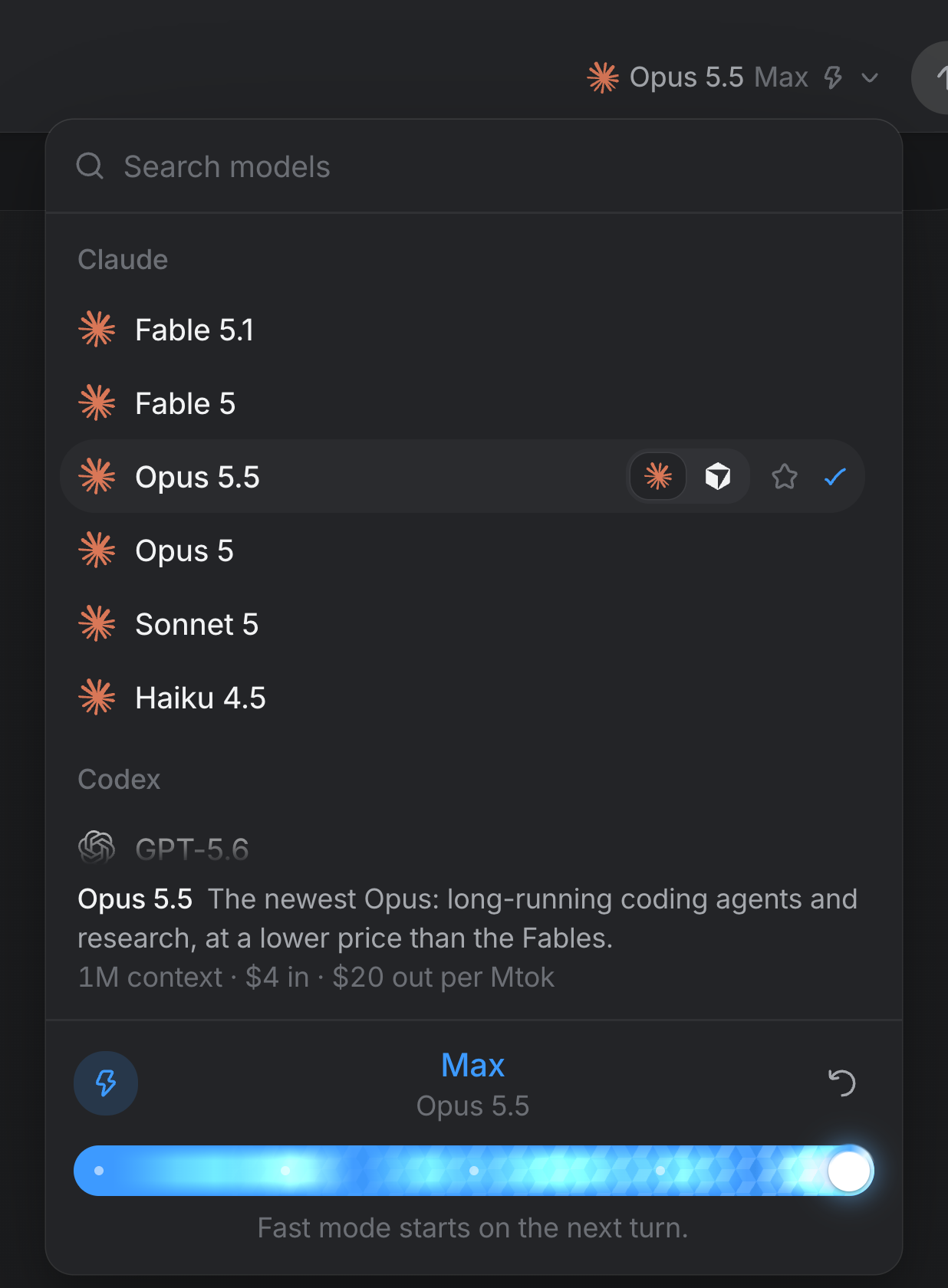
The effort level now actually reaches the agent: on every Codex turn, mid-session for Claude, and through an ACP agent's own thought level where it has one. Fast mode set before a session's first message really does run fast now. Until this release it never reached Claude at all. Picking a model no longer closes the picker, so you can set its level and fast mode in the same visit. At XHigh or Max the track lights up the way this site draws light, with streams running into a white core at the knob, hotter at Max.
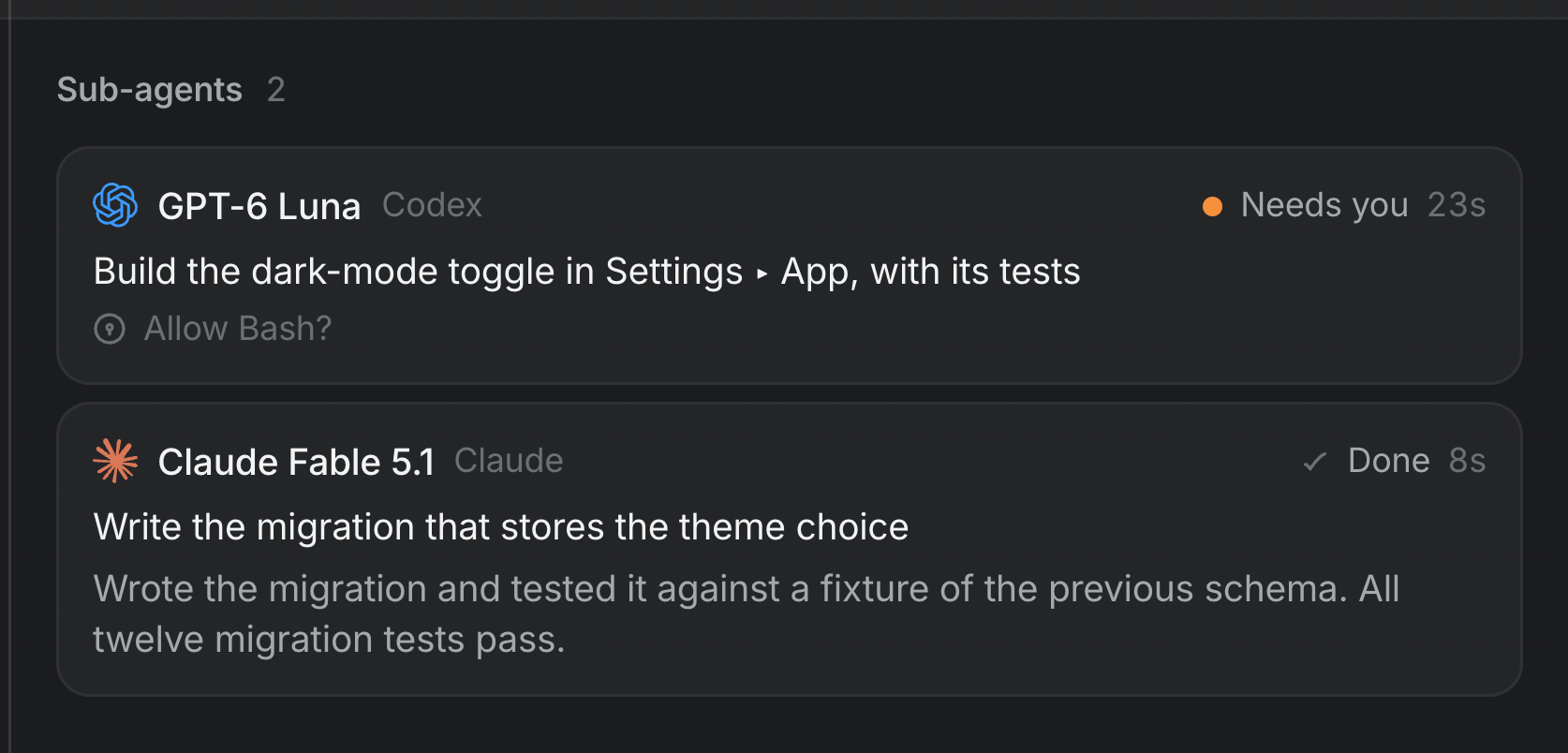
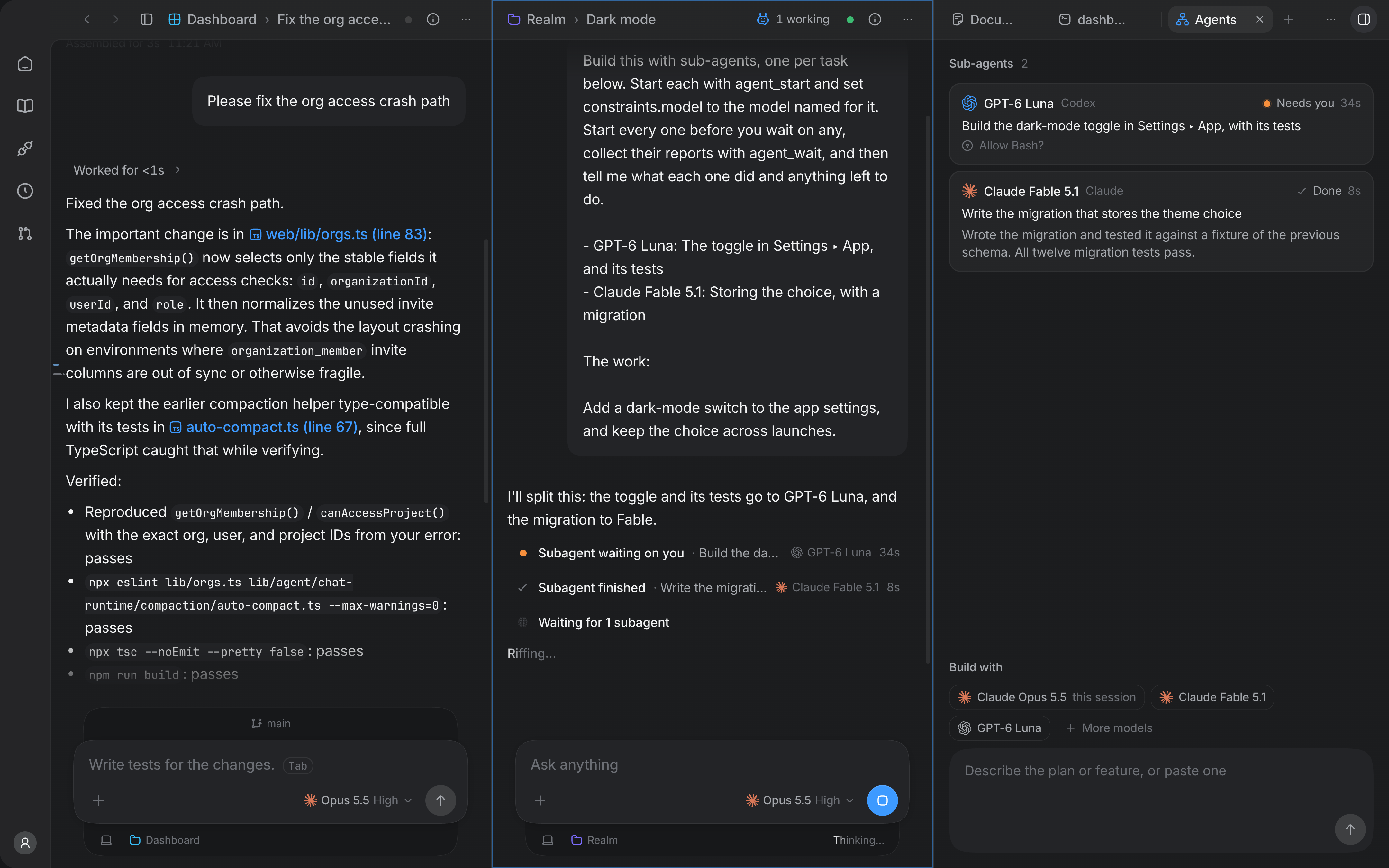
A session can hand work to other models. Ask in words ("have GPT-6 Luna build this") and the session's agent starts a sub-agent on that model. Models are found by name, whichever harness runs them. Or open the session's Agents tab. It lists the session's sub-agents with each one's model, its task, where it stands and its report, and under them is Build with, where you pick models and say what to build. That sends a normal message in your name, so the session's agent still splits up the work, waits for the reports and tells you what each one did, right next to your ask. In the transcript each sub-agent gets a quiet line of its own, like "Subagent finished · Write the tests", instead of being folded into a "Worked for 8s".
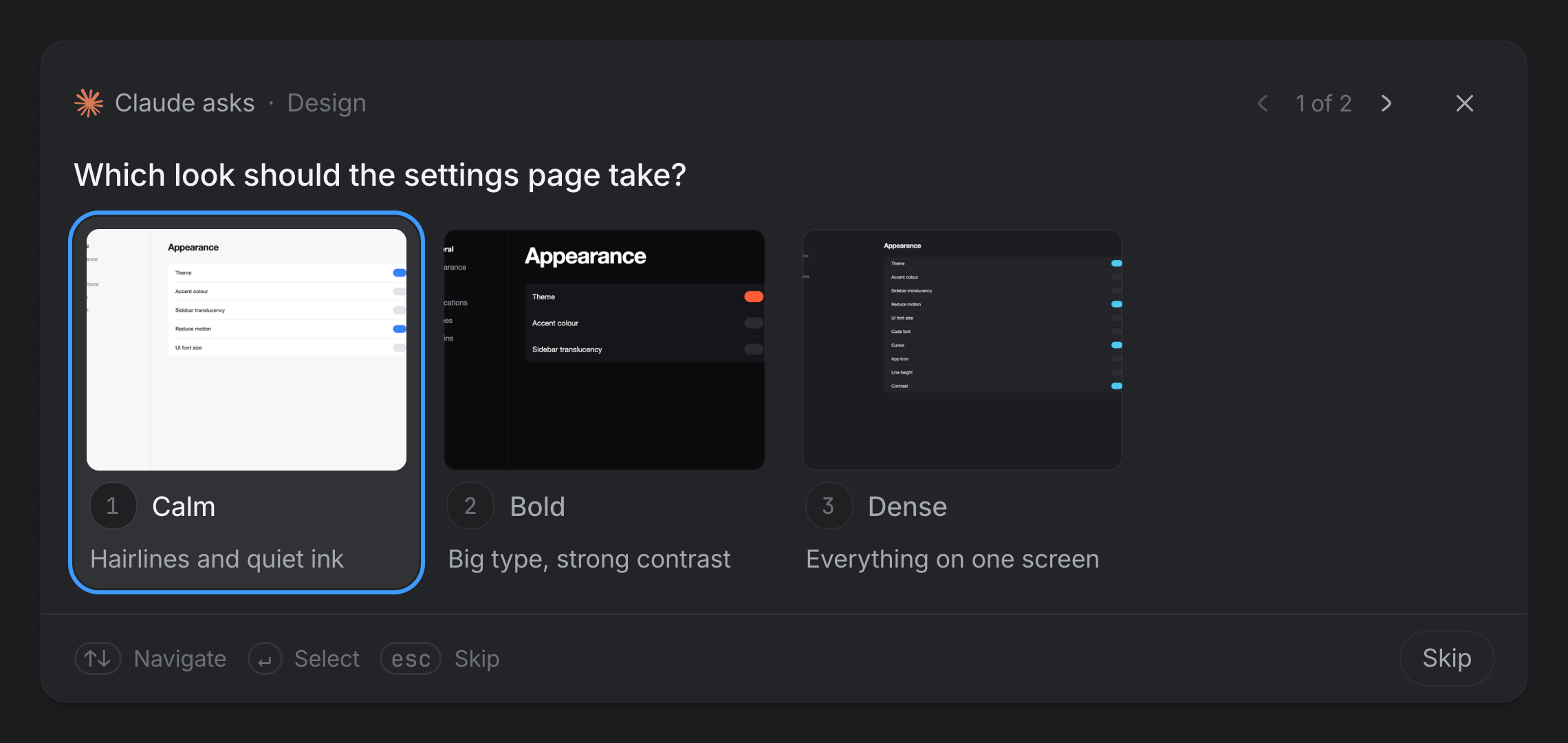
Every agent's questions come on one card. A question looks the same no matter which agent or server asks it, and it says who's asking first ("Codex asks", "Linear's MCP server asks") because the same question means something different from each of them. The ways to answer are Realm's, not the asker's: options, with pictures as tiles; several at once; text, masked when it's a secret; a model for each step of a plan, from the catalog; a file, a branch, a date or a time. Press 1 to 9 to pick an option, Return for the highlighted row, and Escape to skip. Codex's questions used to never show up at all. They reach the card now, and Gemini, Cursor, the other ACP agents and a Connection's MCP server in the middle of a call can ask too.
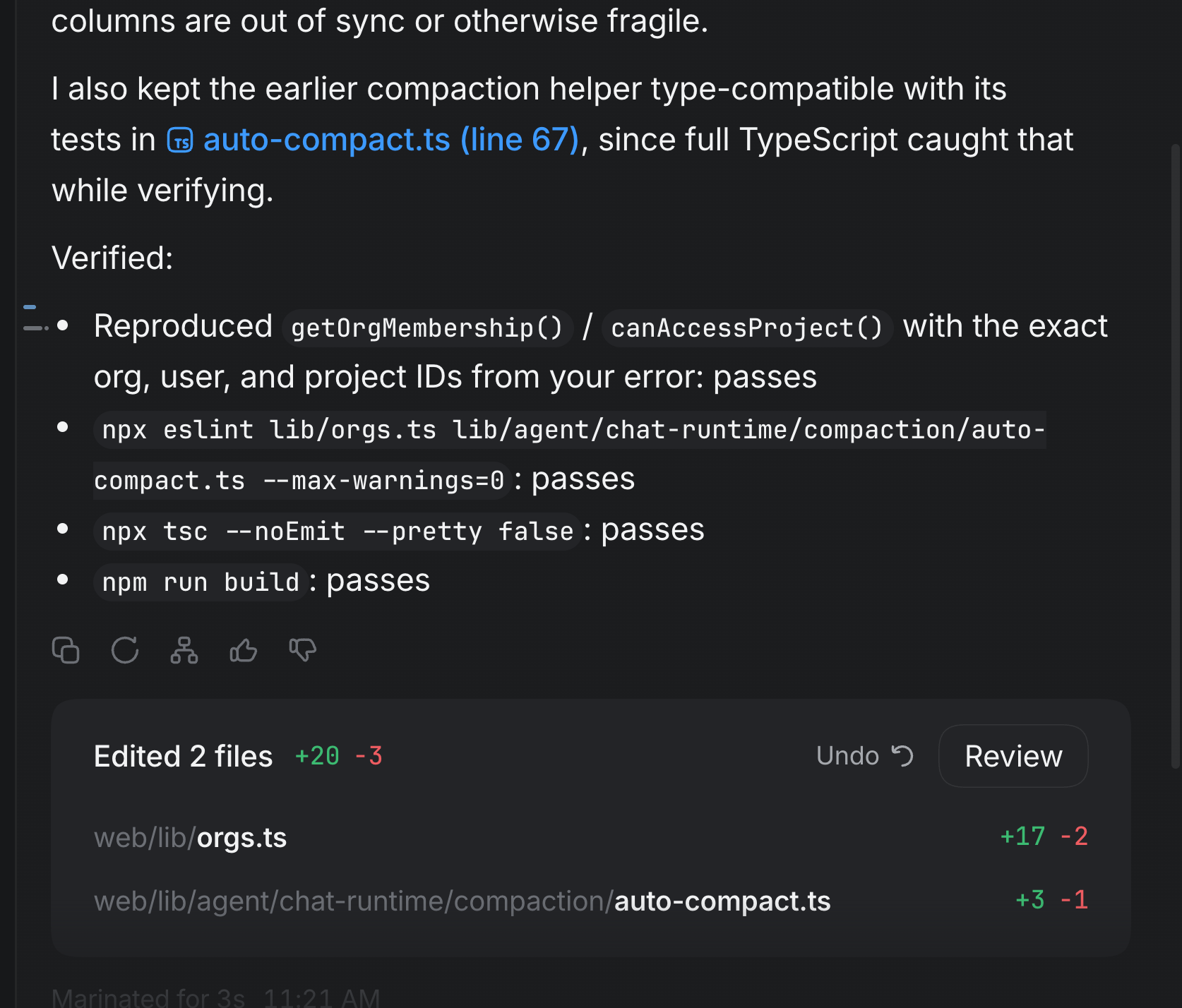
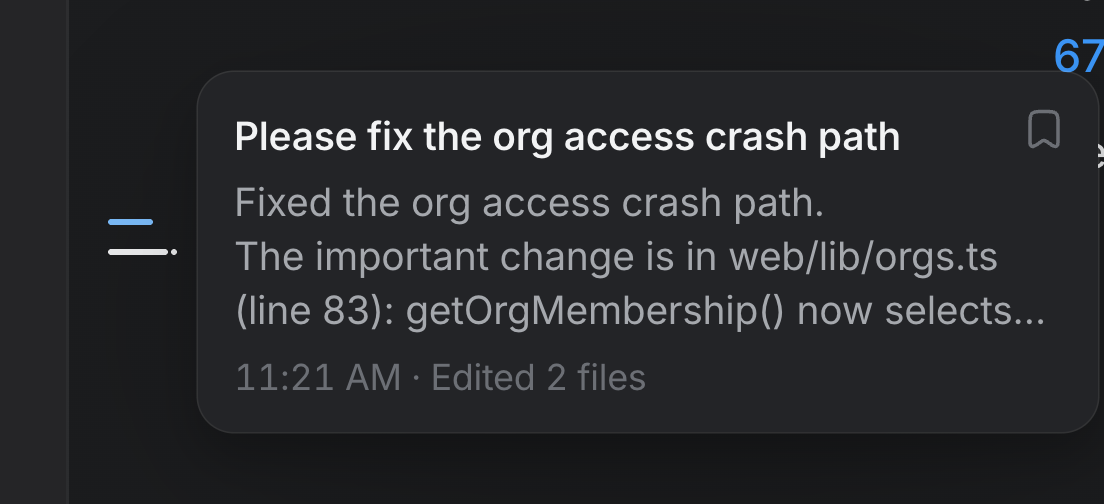
The transcript says when each turn happened and what it changed. A finished turn is dated: a clock time today, then Yesterday 7:38 PM, then the date. It used to show a bare time that looked the same a minute later or a week later. A turn that failed says Failed after 4s. When the agent names a file that's really in its checkout, the name becomes a link that opens next to the session at the line it named. A turn that changed files ends with an Edited 3 files card, listing each file with its line counts from git at the moment the turn settled. Review opens that turn's diff in the side panel, and Undo shows up only when a checkpoint can take back exactly that turn and nothing after it.
A track down the edge of every transcript, and turns you can keep. A session pane has a tick down its left edge for each prompt, placed where that prompt sits in the log, with a dot on any turn that changed files. Hover over a tick and a card shows what was asked, how the answer started, when it happened and what the turn edited. Click and you jump there. The bookmark in the card's corner (or S on the track) saves the turn, ⌥↑ and ⌥↓ step between saved turns, and Library ▸ Saved lists every saved turn in the profile.
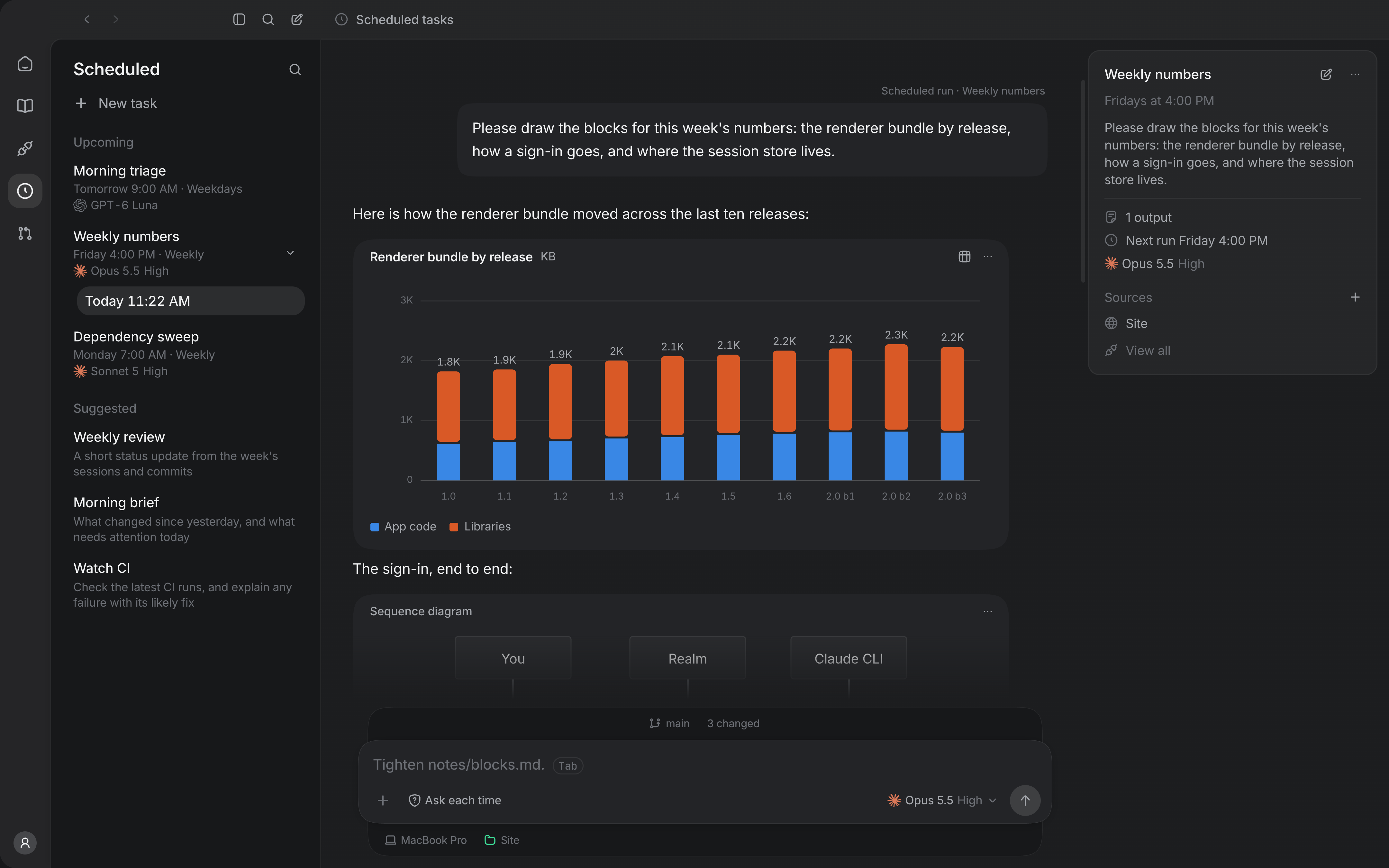
A reply can include a chart, a diagram or a comparison. An agent can write a Mermaid diagram, a realm-chart (columns, bars, lines or a sparkline) or a realm-compare of up to six options as a fenced code block. Once the block closes, the transcript draws it in Realm's own palette, with the values one click away and the source one more. If the body doesn't parse, it stays code and tells you why. Nothing in a block fetches anything, and in a narrow column a comparison turns into one card per option.
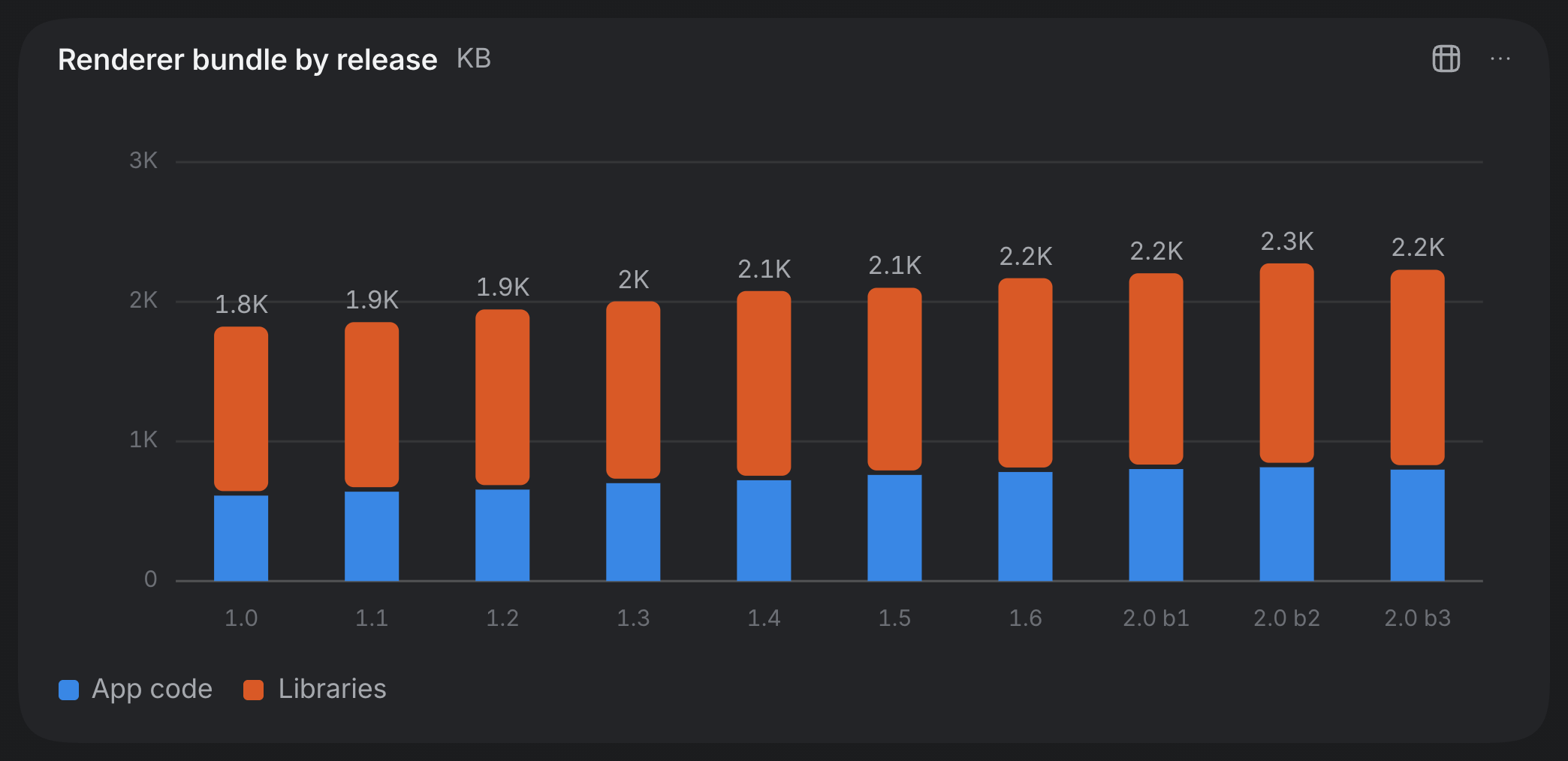
realm-chart an agent wrote, drawn in Realm's palette once the block closed.A Connection can show its own views, and they only act when you click. If an MCP server ships views, as the MCP Apps extension describes them, Realm draws them under the tool call that made one or as a tab next to the session. Each one sits in a sandboxed frame on its own origin. Anything a view asks to do (run one of its server's tools, write a message for the agent, open a page) waits on a card that Realm draws outside the frame, where the view can't reach it or fake it, and only your click answers.
The window
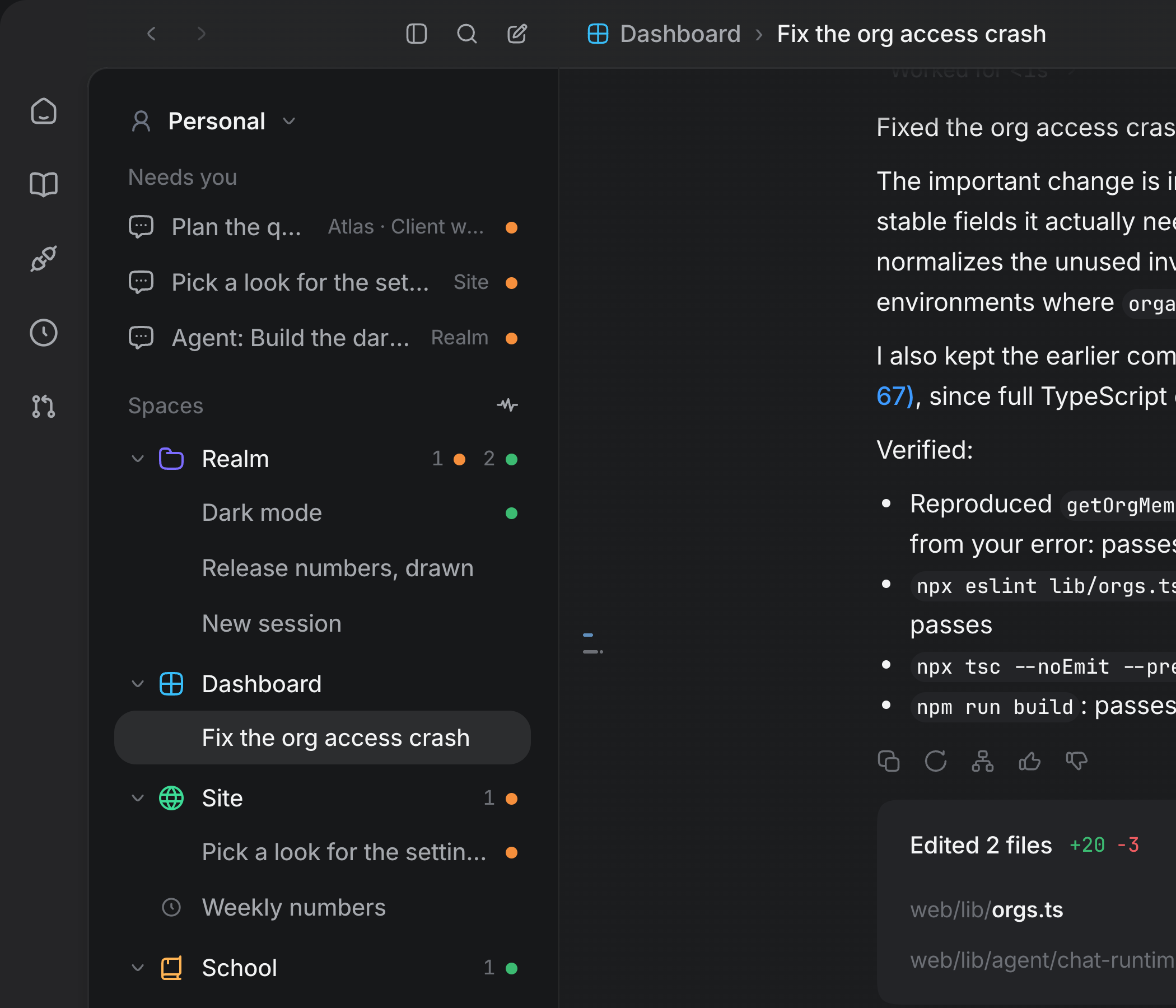
Every space is in the sidebar at once. A space used to be a room. You stood in one, the sidebar listed what was in it, and an agent waiting in another space was a badge on a strip and a few clicks away. Now each space in the profile is a section of one list, under a Spaces caption, with its name in its colour, a count of what's waiting and working, and its sessions, the ones that need you first. A section folds and remembers that it's folded, its + starts a session there, and its ⋯ gets you to the space's folder, connections, memory and settings. Pinned collects the pins from every space, and the activity button lists the same sessions by when they last moved. Since you no longer go anywhere to be in a space, a session's bar says where it works, Space › Session, in the space's colour.
The window shows one view instead of a layout per space. Make as many panes as you want, split right or down and nested however you split them, with sessions from any space. Moving between them loads nothing, because every space is already loaded. The only limit is room. A pane is never drawn narrower than 280 points or shorter than 300, the smallest a session's prompter and transcript work at, so when another pane would go below that, Split right and Split down are turned off and tell you what would make room. A session is only on screen once. ⌘-click a session to open it next to the one you're in, and ⌘\ and ⌘⇧\ split. Named splits went away with the rooms. The view, and where the keyboard was in it, survive a relaunch.
What an agent opens shows up as a tab in the side panel. A browser, a device, a document or a terminal that an agent opens becomes a tab in the one side panel at the right edge of the window. It used to open as a new column next to whatever had focus, which is how a fan-out of six agents once filled a window with eight columns too narrow to read. The panel is the full height of the window and takes half the room to the right of the sidebar until you drag its edge, and it narrows before any pane drops below its minimum. Its strip holds the tabs of every session on screen, grouped by session in the order you read the panes. Every browser tab stays live behind the one that's showing, and the + after the tabs opens a blank tab listing the session's tools: Documents, Terminal, Agents, Simulator and Machine.
A rail holds the app's pages, and Home takes you back to work. Library, Connections, Scheduled tasks and Code review are a narrow column of icons at the edge of the window, under Home, and the column stays when ⌘B folds the sidebar away. Home isn't a page. It puts away whatever page is up and lands on the session that was in front, so it's never lit and never shows a count. At the bottom of the rail are the Stop button for a Laya recording while one runs, a disc when a newer Realm is out, and your avatar. A page with its own column (Settings, the Library, Scheduled tasks, Code review) puts that column where the sidebar is instead of drawing a second sidebar next to the first. It's headed by the page's name, and every column's first row sits at the same height, so going from Home to a page doesn't shift anything.
Everything that needs you is in one list, and you can answer from it. Needs you, at the top of the sidebar, collects every session waiting on a permission or a question (longest wait first, then failures you haven't read) from every space and every profile. It only shows up while something is waiting. A waiting row unfolds that session's own card: Allow, Allow always or Deny, or the question and its fields. These are the same cards the transcript shows, so answering in one place clears it everywhere.
A session's bar is about the session, and sessions don't have a close button. The bar used to carry seven icons for the tools a session can open next to itself. Now it shows where the session is and its name, how many agents it has working, its status, one button for what it made, and its menu. You leave a session from the sidebar, the same way you got to it, and ⌘W closes whatever the keyboard is in: a tab leaves the side panel, and a pane leaves its split.
New space asks what the space is for, then drops you into it. The sheet starts with the name, with the space's icon next to it (a symbol, an emoji, a generated one or one you upload) and its colours underneath. Then one card holds the rest: a folder, the profile, and the memory every session there reads before it starts. Create starts a session in the new space with the keyboard already in its prompter, and if something fails, everything you typed is still there.
First run gets you to a signed-in agent without a terminal. It used to be thirteen identical radio rows next to a form, and a row that said "Not installed" or "Signed out" handed a newcomer a problem with no way to solve it. Now it's one page. Choose your agent shows Claude and Codex as cards that do whatever their state needs right there: Install, Sign in with Claude, Sign in with ChatGPT, or a field for the code the sign-in page shows. Then name your space, and press Start. Claude doesn't need an install, since Realm already ships with Claude Code.
Look and feel
Notices are toasts now, and tooltips show up right away. A failed action or a refused file used to put a red bar across the top of the window that stayed until you closed it. Now it's a toast at the bottom of the window. It says what it has to say and leaves, waits while the pointer or the keyboard is on it, and slides along the bottom so it stays clear of a browser pane. Anything that needs a decision (a permission, a sign-in, a server that went away) isn't a toast, and it stays until you answer it. Tooltips are the app's own quiet labels now, and they show up a fifth of a second after the pointer arrives instead of the second and a half the system's took.
You can pick your cursor. Settings ▸ Appearance ▸ Cursor sets the caret everywhere you type, including the prompter, every field and the code editor. There are nine shapes and seven animations, plus whether it glides to each new position and whether it uses the accent colour. In 1.5 the prompter's caret couldn't be held still, because it was the platform's. Realm draws it now, exactly where the platform's caret would be. A terminal's cursor can take any of those shapes too, as a separate setting.
Everything that scrolls fades at its edges, nothing sticks, and everything clickable shows a pointer. Every list, page, popover, sheet and strip of tabs fades out where there's more to see. The exceptions are things you read to the last character (code, a diff, a command) and the editors. A page's header scrolls away with the page instead of staying pinned on top of it. The pointing hand shows over everything a click does something to, from one rule. That's a deliberate break from the Mac's habit of showing an arrow over controls.
Realm behaves like a Mac app now, not a web page in a window. A button darkens when you press it instead of shrinking, and lets go if you drag off it, and dragging across the interface no longer selects it like text. Menus are the system's own, so they can open over a browser pane. Popovers and sheets move on a spring. Lists rubber-band with the trackpad but never with a mouse wheel, and a window that isn't in front greys out its accent. There's a real menu bar whose items show your own keybindings, and ⌘R can't reload the app out from under a running agent anymore.
Light mode is actually light. On a Mac set to Dark, Realm's light mode came out a muddy grey. Nothing told macOS that the window had its own appearance, so the material behind it stayed dark and the light background was laid on top. Realm now tells macOS which theme it's in. The light palette also steps the way the dark one does, lets much less of the desktop through, and makes its quiet text dark enough to read.
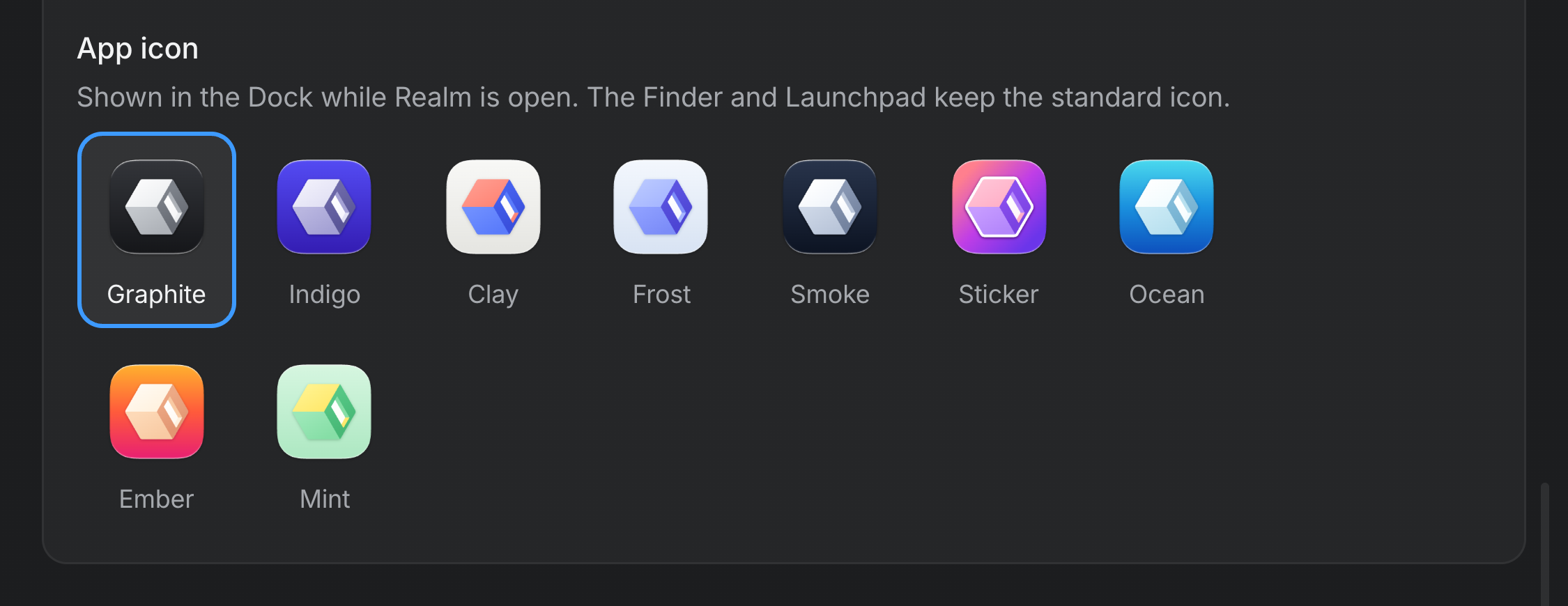
Realm has a new mark, a new icon, and eight more for the Dock. The mark is a cube lying on its side with a lit doorway in its dark wall: a space, and the way into it. The icon wears it in white and greys on a graphite body, using the exact shape macOS gives every app icon, so macOS shows it full size instead of shrinking it onto a grey plate like it did with the last one. Settings ▸ Appearance ▸ App icon has eight alternates drawn the same way (indigo, clay, frost, smoke, sticker, ocean, ember and mint), and your pick goes on the Dock immediately.
Text sizes sit on one scale, and icons are drawn at the weight of their text. Six text sizes had crept into a 2.5px range and were used interchangeably. Now every size is a step on one ladder. Icons come from a rounder set and are drawn heavier at small sizes, the way a Mac draws small symbols, so a 12px icon isn't a hairline next to its label anymore. Labels that were set in spaced-out capitals are sentence case now.
Pages
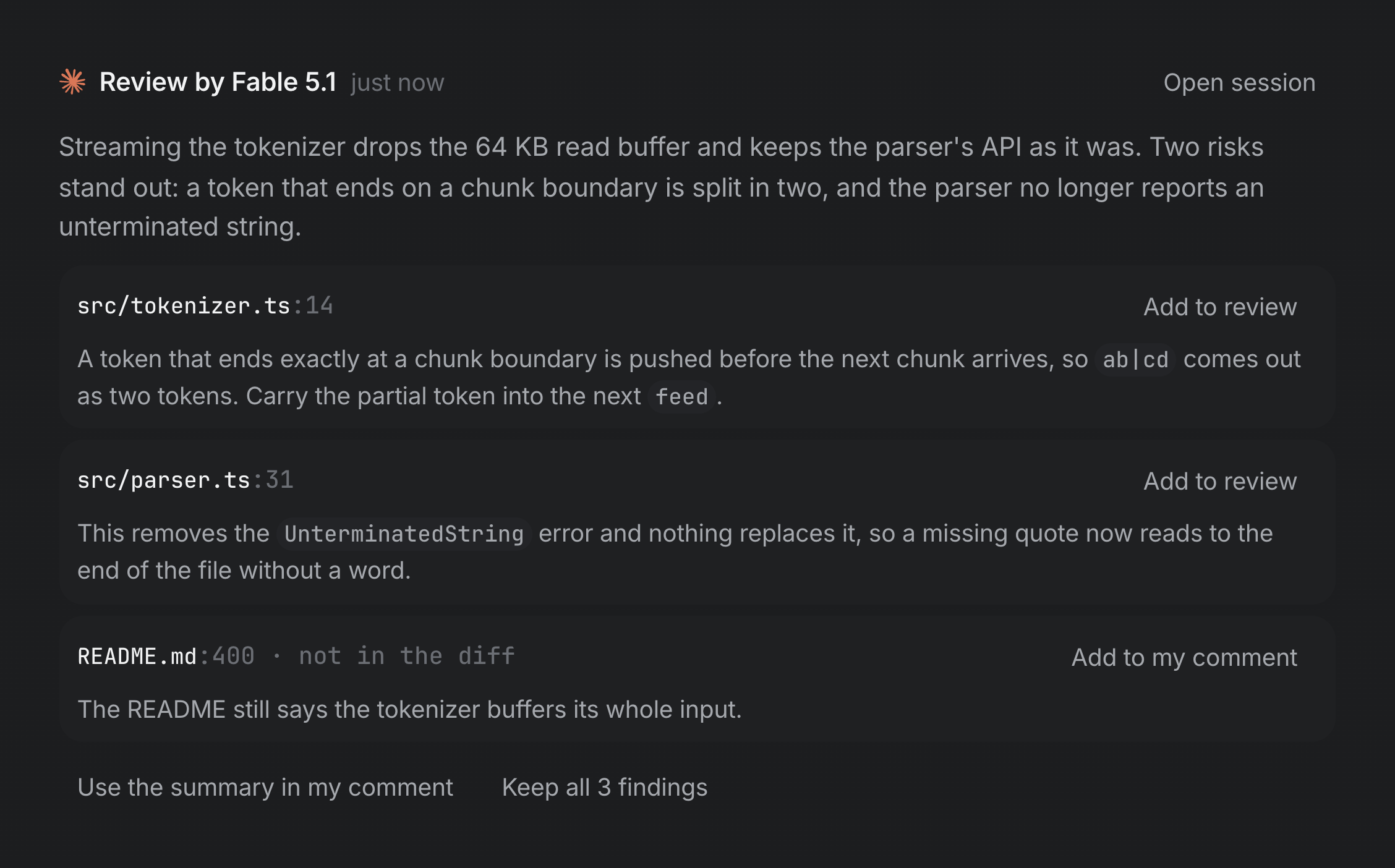
Pull requests are read and reviewed in Realm. Code review, on the rail, lists your GitHub pull requests through your own gh, so Realm holds no GitHub token and sees exactly what gh sees. Its column has Authored by me, Needs my review and Needs my team's review, with any you pin at the top. A pull request opens on its Summary (its description, whether it can merge, who has reviewed it, its checks) and its Changes, side by side or in one column, next to a file tree. Review with runs a reviewer over the diff at the model, level and speed you pick in the prompter's own picker, in read-only mode, and leaves its findings on the page. Each review notes the level it ran at. None of the findings, and none of your line comments, reach GitHub until you press Submit review and pick Comment, Approve or Request changes.
Scheduled tasks have their own page, and every run is a session. A column holds New task, your upcoming tasks with the model each one runs on, their runs underneath (each new run stays unread until you open it), and some suggestions to start from. Next to it, a run is its real session, with the transcript and a prompter to keep going. The task's card sits at the top right: when it repeats and when it runs next, any run it missed while the Mac was asleep, and Run now, Pause, Edit and Delete. A task can repeat hourly, daily, on weekdays, weekly, monthly or on a cron expression, or run once. A run lands under its task instead of opening a pane next to whatever you were doing.
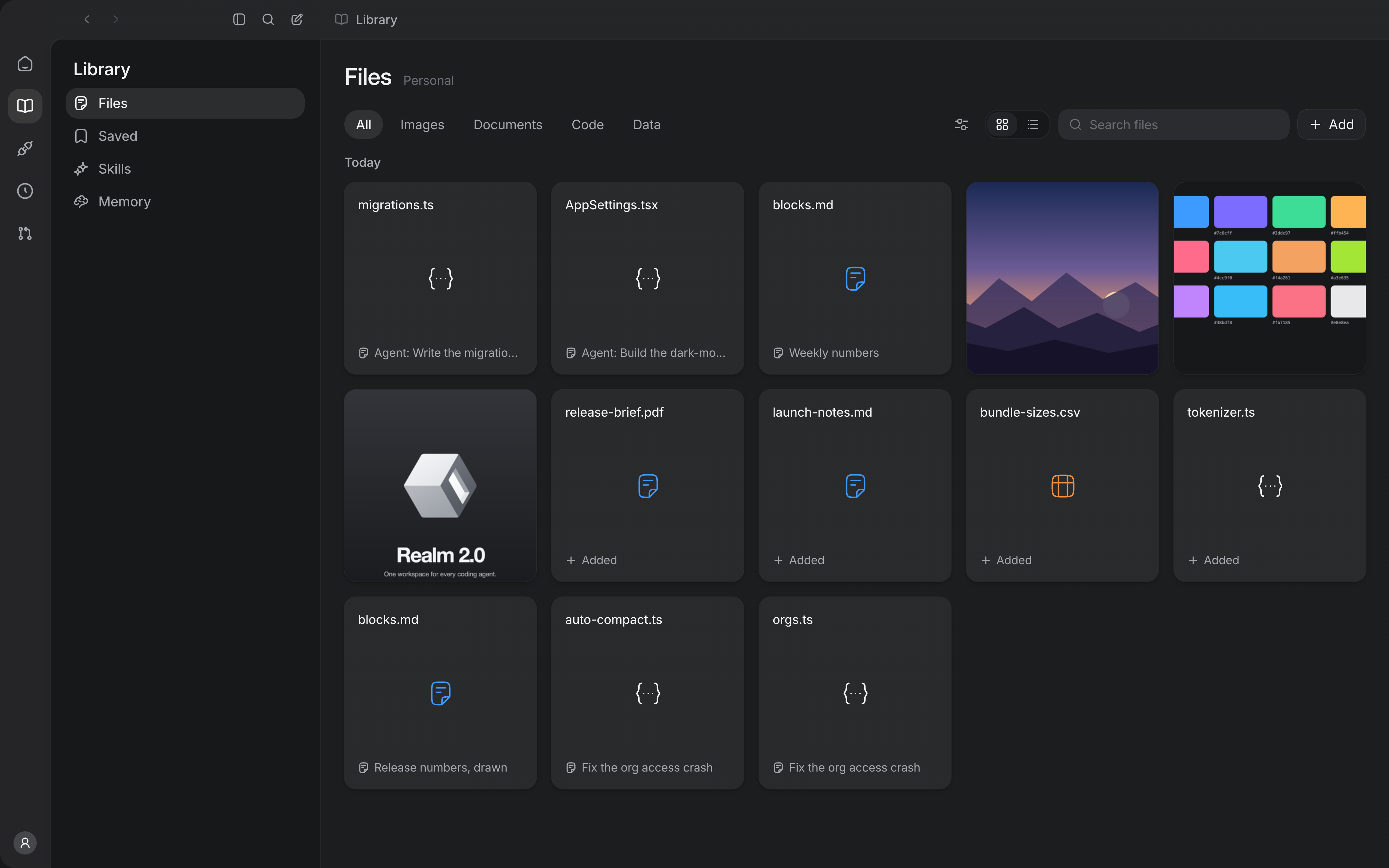
The Library sorts by kind and takes your own files, and Memory saves itself. The Library's files have tabs (All, Images, Documents, Code, Data) next to a filter for where a file came from and who made it, a choice of tiles or rows, and a search. Every file is one square tile, and a picture fills its whole tile. Add, or dropping files anywhere on the page, brings your own files in as Realm's own copy. Remove from Library takes one back out, and you can undo it. Memory used to be a text box with a Save button. Now it's the document itself, at reading size, with Write and Preview, and it saves when you pause typing.
Settings is grouped by what you came for, and you can actually read it. The pages sit under You, Engines, Browser, Computer and Data, and a search finds any row and opens its page right at that control. Rows are cards now, with labels at reading size and descriptions dark enough to read. The old hints measured 3.5:1 on the dark background. Appearance adds UI and code text sizes that change the type without zooming the layout, a content font for messages and documents, Reduce motion as System, On or Off, and separate translucency for the sidebar and the panes.
A page about you. Your avatar at the bottom of the rail opens it. It shows your tokens over all time, your busiest day, the longest an agent has worked on one turn, your current and longest streaks, an activity calendar by day, by week or as a running total, and the models, efforts, skills and tools you use most. If no engine can report a number, it's left off with the reason instead of showing a zero.
Files, browsers, terminals and devices
The Documents pane opens on your files. With nothing open it used to say "Nothing open yet" over an empty pane. Now it opens on a home page: what this session has made and been given, then the Library's files, under one search that also finds files in the checkout by name. ⌘P jumps to that search from anywhere. New makes a document, a spreadsheet, a presentation, a LaTeX paper, a study guide or a code file, named with its extension and opened in the code editor.
One viewer for every file, with the prompter under it. A picture in a message, a chip in the prompter, a tile in the Library and a session's files all open the same viewer, with the session's prompter docked underneath. A question you ask there becomes a turn in the session the file came from, with the file attached. Mark up lets you draw on a picture, and your next question carries a copy with the marks in its pixels, so the agent sees what you circled instead of reading a description of where.
A file in Realm does what a file in the Finder does. In the Library, the Documents pane's home or a session's file list, Space shows a file in Quick Look and Return opens it. You can drag it out into another app as the real file, and its menu has Quick Look and the Share menu.
A terminal's tab says what's running in it. A terminal's tab, its pane bar and its dock show the icon of whatever is in the foreground: an agent's own mark in its maker's colour, a tool's icon for node, python, vim and the rest, or the shell's. They name the program before the folder, like "claude · realm". Only agents get colour there. Terminals use Realm's own sixteen colours, tuned for each theme, and a powerlevel10k prompt keeps its colours and icons.
A page that didn't load says so. Typing localhost:3000 with nothing listening used to leave a blank white pane. Now the pane shows a page instead ("This site can't be reached", the reason, what to try, the error code and Reload), and an agent driving the pane gets told the same thing in words, where it used to read an empty page.
The browser pane has a browser's controls. Each tab shows its site's own icon. The ⋯ at the end of the toolbar opens Find in page, Print, Zoom, Take a screenshot, downloads, history and Clear browsing data. Device size lays the page out at an iPhone's, an iPad's or a desktop's width, the address field suggests pages you've visited, and Annotate lets you pin several elements on a page, numbered, and send them to the session as one chip.
Agents get the simulator pane, and hands to use it with. The simulator tools give an agent the device pane itself. It can list devices, open one next to the session, take a screenshot, read the elements, install, launch and open a URL, and it can tap, swipe, type and press the hardware buttons, on iOS simulators and Android emulators. A walk takes a whole path of labels in one call, like ["General", "About"], finds each one on the live screen, presses it and reports where it ended up. It stops instead of guessing, and it stops before any step that buys, deletes, sends, signs out or types a secret.
A real iPhone, over the cable. A connected iPhone or iPad shows up in the device pane's picker. Pick it and Realm builds a small test runner, signs it with your own Apple Development identity and runs it on the phone. After that, the agents' device tools work on it the same way they do on a simulator, over a live picture. Since a phone is somebody's actual phone, the rules are stricter: its cards ask even under Full access, a locked phone is refused, the side button is never pressed, and every touch is checked under the finger right before it lands.
Laya, a decision model that runs on your Mac, watches agents work. Settings ▸ Engines ▸ Laya installs it when you ask. That's about 1 GB of PyTorch and 0.8 GB of weights, on Apple silicon. In Shadow mode it's asked about every step an agent takes in a Mac app, on a device or on a web page, and its answers are logged next to what actually happened. Nothing it says reaches the agent, a permission card or the transcript. Assist mode, where Laya picks the element an agent describes in words, only unlocks for a checkpoint that's right 95% of the time on steps it never trained on. None is yet, so Assist stays locked and tells you how far off it is.
Profiles and sign-ins
Profiles keep their sign-ins to themselves. Every browser pane in every profile used to share one cookie jar, so Work was signed in to whatever Personal was, and an agent in a Work space was offered Personal's saved passwords. Now each profile has its own cookies, saved sign-ins, passkeys and browsing history. When you do want to share, a saved sign-in or passkey has Share with, and you can make, rename, recolour and delete profiles in the app.
An agent can make a password for a sign-up, and nobody sees it. When you asked an agent to create an account, it had nowhere to put a password except the chat. Now it can ask Realm to make one. Realm generates it on this Mac, saves it to the profile's sign-ins and types it into the page, after a card that names the site and after Touch ID. The agent never learns the value.
A profile can have its own window. The profile switcher, or the command palette, opens a profile in its own window or brings forward the one already showing it, so Work and Personal can sit side by side.
What's gone
- The Agents page, with its List, Wall and Office, and the Start agents… sheet. What it ranked now shows on each session's own row, under Needs you and on the Dock badge. To put several agents on something, you ask a session, in words or from its Agents tab.
- The Notifications page and its bell. Notifications still reach macOS and count on the Dock, the iMessage and Slack relay still sends, and Settings ▸ Notifications still decides what counts. Code review took the page's spot on the rail.
- The red bar across the top of the window, replaced by toasts.
- The lightbox and the file preview sheet, replaced by the media viewer.
- The ⌘P file palette, replaced by the Documents pane's own search.
- The close button on a page's bar, replaced by Home, the rail, the sidebar and Escape.
Smaller changes and fixes
- Claude's weekly and five-hour limits read correctly now. Both readings were treated as if they were already a percentage and milliseconds, so an 86% week showed as "Weekly limit at 1%", resetting on a day in January 1970.
- The question and plan cards are as off-limits to an agent driving the window as the permission card already was, and so are Build with and Implement with…, which start paid work in your name.
- A masked answer reaches the agent that asked and nothing else. The log, every window, the Activity record and an exported session keep a placeholder instead.
- A space whose folder isn't a git repository just has no worktrees, instead of announcing it in a red bar across the window.
- Scrolling a long transcript no longer redraws the whole thing on every frame, and an answer fades in as it streams instead of appearing in chunks.
- Realm's own tools can run past Codex's one-minute limit on a tool call.
- Send now on a queued message waits for the Claude turn it interrupts to settle, instead of landing inside that turn and getting lost with it.
- A sidebar row with news shows the unread ring, which until now could never appear, and opening the session clears it.
- Skills in
~/.agents/skills,~/.claude/skills,~/.codex/skillsand~/.cursor/skillsare found now. The scan had been looking inside Realm's own folder. - A theme with a hue, like Rosé Pine or Nord, colours the sidebar as well as the panes.
- Panes are a little more see-through by default, at 84%. That's the most see-through they can be with body text still passing WCAG AA on every theme, measured over a white desktop and a black one.
pnpm app:updatesigns the build with your Developer ID, so macOS keeps its Accessibility, Screen Recording and Automation permissions from one install to the next.