Work with agents
Permissions and Full access
What an agent may do without asking you, how to answer when it asks, what Full access changes and what it never does, and the sandbox a space can put its agents in.
The permission chip
Beside the + in the prompter is a shield and a word: the session's permission mode. It's offered for Claude and Codex, the two agents Realm can set a mode on. From least to most trusting:
| Mode | What the agent does |
|---|---|
| Ask each time | Asks you before it edits a file or runs a command. New sessions start here unless you change it. |
| Accept edits | Edits files without asking, and still asks before running commands. On Codex it behaves like Ask each time. |
| Full access | Runs tools and edits files without asking first. The shield turns red so you can see it at a glance. |
Click the chip to change it. Choosing Full access asks you to confirm with Allow everything? Confirm before it takes effect. On Codex a change applies from the session's next start.
On Claude the change applies straight away, and a session can move to Full access mid-session whatever mode it started in. A card already waiting stays there for you to answer. Where Claude Code only takes Full access when it starts, Realm starts it again on the same conversation before your next message. If Claude Code refuses outright, because Full access is turned off in its own settings or Realm is running as root, the session says so and keeps the mode it had.
To change what new sessions start with, use Settings ▸ General ▸ New sessions start in. Each session's chip can still change it.
Answering a request
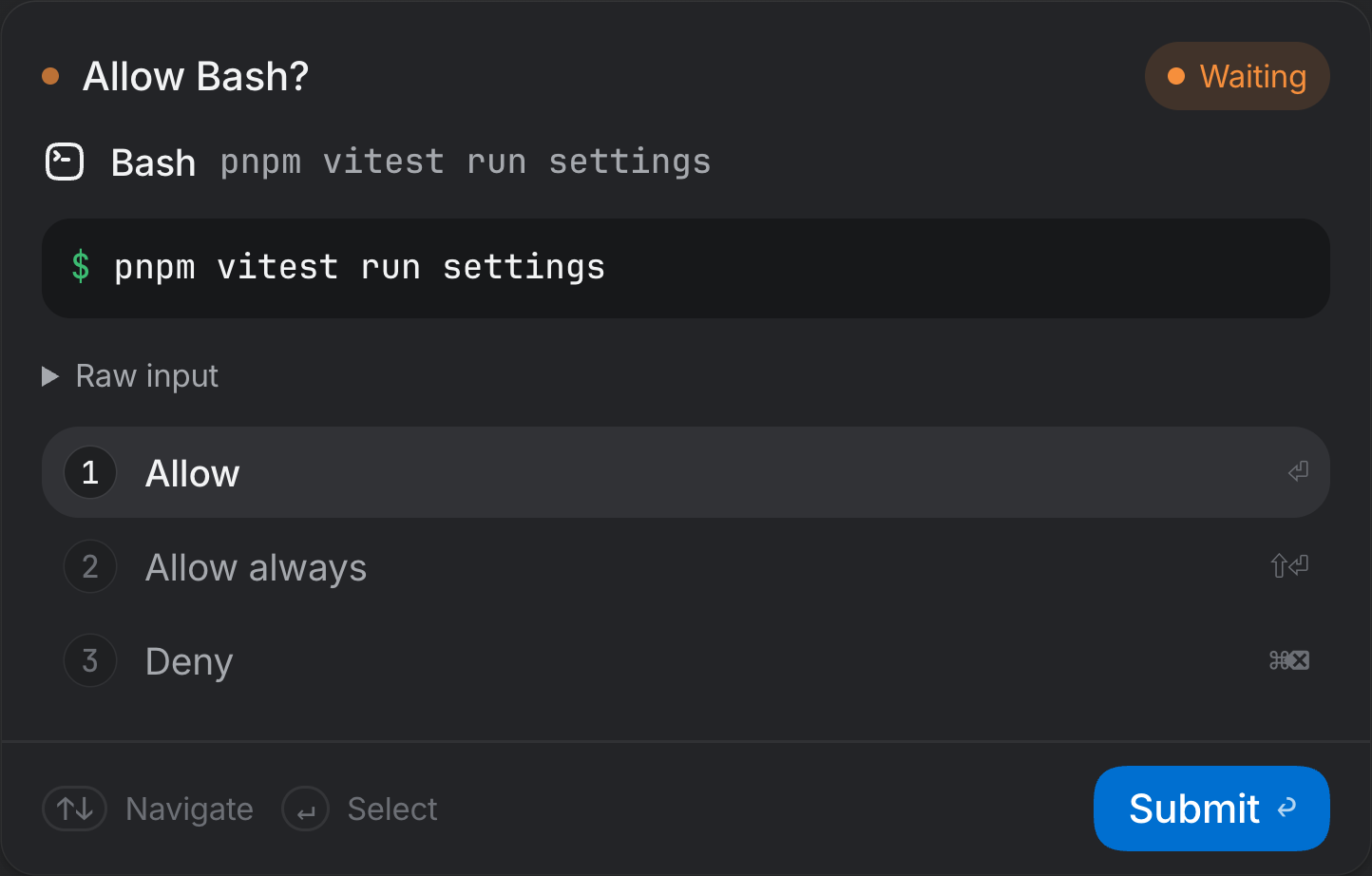
When an agent wants to do something its mode doesn't cover, its session shows a card saying what it wants: the command it would run, the diff it would write, the page it would open. The card has three answers:
| Answer | Keys | What it does |
|---|---|---|
| Allow | 1 or ↩ | This once |
| Allow always | 2 or ⇧↩ | This and the same request again, for the rest of the session or as the agent defines it |
| Deny | 3 or ⌘⌫ | Refuse. Esc denies too. |
Requests show up wherever you're looking: under Needs you at the top of the sidebar (with Answer here to answer in place), as a count on the session's row, and as a notification when Realm isn't the app in front. Settings ▸ Notifications can also send them to you as a text message or a Slack post.
For computer use, Allow always reads Always allow in this space and adds the app to the space's list. For a saved password, it reads Always allow on this site.
What Full access does not change
Full access skips the cards for ordinary work. A few things ask, or refuse, whatever the mode:
- Saved passwords. An agent filling one always shows its card, and Touch ID, or however your profile unlocks, still applies. See the browser.
- Typing passwords. An agent can't type into a password field in a web page, or at a password prompt in a terminal, in any mode.
- Other Mac apps. Each app asks the first time in a space. Realm itself, System Settings, password prompts, Keychain Access and terminals can never be driven.
- Real devices. Driving a physical iPhone, iPad or Android device asks. Simulators don't.
- Terminals the agent didn't open. Reading or typing into one of yours asks.
- A team's policies. In a space with a team, its rules bind every session in the space, yours included.
Unattended work runs in Full access
Nobody is there to answer a card when a scheduled task or a team role runs, so those always run in Full access. A team's policies still ask and refuse for its roles, and anything a role wants to post outside Realm waits for you in Review.
A sub-agent runs in its lead's mode, or a stricter one if the lead asked for less. A sub-agent of a Full access session has Full access; one of an Ask each time session asks, on its own card in the lead's Agents tab.
The sandbox

A space can run its agents and terminals inside a macOS Seatbelt policy, set on the space page's Sandbox tab. Seatbelt isn't a container: it limits which files a process can read and write, but the process still shares your Mac. If Realm can't apply the policy, the session refuses to start rather than starting unprotected.
| Posture | What agents and terminals may do |
|---|---|
| Workspace write | Write only to this space's checkouts, their build caches, the agent's own state folder and a temp folder. ~/.ssh and ~/.aws can't be read, and files that make something run later, like ~/.zshrc and ~/.gitconfig, can be read but not changed. |
| Read only | Write nothing but their own temp folder. Edits, installs and builds fail. |
| No sandbox | Run as you, with everything your account can read and write. New spaces start here. |
The network stays open unless you untick Allow network access, which blocks every connection, and most agents can't run without reaching their own service. So the sandbox limits what a session can damage or read, not what it can send. Codex sessions can't be sandboxed in this release: in a sandboxed space a Codex session refuses to start, so set that space to No sandbox to use Codex there.
- Open the space's page (Space settings in its menu) and choose Sandbox.
- Pick a posture. The page says whether this space follows the default or sets its own; Use the default instead goes back.
- Run a build in the space and check nothing you need is refused before you rely on it.
Questions that aren't permissions
Agents also ask questions, which arrive as cards that say who is asking. Answering one grants nothing. A form from an MCP server, Codex or another agent's own protocol that asks for a key or a password is declined, and its card says so, without the form ever being drawn, because such a form can't mask what you type. Secrets reach a site through saved passwords, and a connection through its own sign-in. When an agent asks through Realm's own question card, a secret field is masked and your answer is kept out of Realm's records.